CI/CD stands for continuous integration and continuous delivery. It's the practice of automatically building, testing, and preparing code for release every time a developer commits a change. CI merges and verifies code continuously; CD keeps every verified build ready to ship. Together they turn releases from risky, occasional events into a routine part of development.
What is CI/CD?
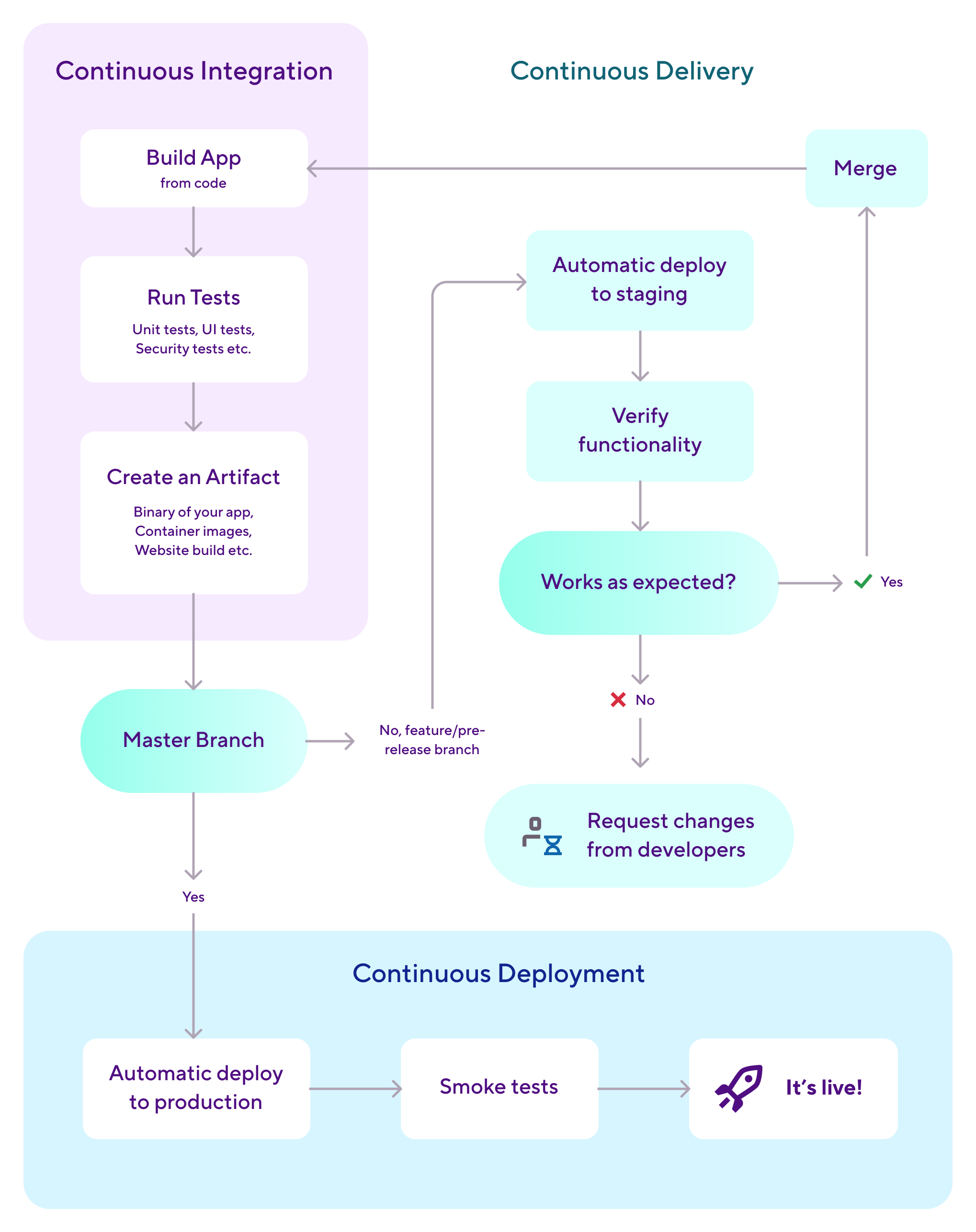
CI/CD combines two practices that share one goal: getting working software to users quickly and safely. CI is continuous integration, where developers merge small code changes into a shared repository several times a day, and every merge triggers an automated build and test run. CD is continuous delivery, which takes each build that passes those tests and packages it so it's ready to release at any moment.
You'll also see CD used for continuous deployment, a stricter version where every passing change goes straight to production with no human approval. And a third practice often comes along with them: continuous testing (CT), which runs automated tests at every stage of the process rather than saving them for the end.
For a web team, CI/CD ends with code running on a server they control. For a mobile team, it ends with a signed binary heading into app store review. That difference changes how mobile teams practice CI/CD, from code signing in the build stage to release timing, and it's why a generic CI/CD setup rarely fits an iOS or Android project without adjustment.
How does a CI/CD pipeline work?
A CI/CD pipeline is the automated sequence of stages a code change passes through on its way from commit to release. Each stage acts as a quality gate: the change only moves forward when the previous stage passes. Most pipelines follow five stages, whatever tool runs them.
- Source. A developer pushes a commit or opens a pull request. The pipeline starts automatically from this trigger; nobody kicks it off by hand.
- Build. The code compiles into an artifact. For mobile, this means producing an APK or AAB with Gradle, or an IPA with Xcode, including the code signing that both platforms require.
- Test. Automated checks run against the build: unit tests, integration tests, UI tests on simulators or real devices, and static analysis.
- Deploy. The verified build goes somewhere useful: a staging environment, internal testers via TestFlight or Firebase App Distribution, or the store itself.
- Monitor. The team watches crash rates, performance, and rollout health, feeding what they learn back into the next cycle.
The pipeline itself is defined as code, in a YAML file stored in the repository next to the app. Here's a trimmed example of a Bitrise workflow that runs the build and test stages for an iOS app on every pull request:
format_version: '13'
default_step_lib_source: https://github.com/bitrise-io/bitrise-steplib.git

workflows:
  primary:
    steps:
    - git-clone@8: {}          # Source: check out the triggering commit
    - xcode-test@6:            # Test: build and run unit + UI tests
        inputs:
        - project_path: MyApp.xcodeproj
        - scheme: MyApp
    - deploy-to-bitrise-io@2: {}  # Deploy: upload artifacts and test results
Because the configuration is version-controlled, pipeline changes get reviewed like any other code change, and you can trace every build back to the exact pipeline definition that produced it.
Why CI/CD matters for mobile development
Mobile teams feel the absence of CI/CD harder than most, because mobile releases are expensive to get wrong. A shipped web bug can be fixed in production within minutes. A shipped mobile bug has to go back through the entire build, sign, and store review cycle before users see the fix, and Apple's own review guidance says 90% of submissions are reviewed in less than 24 hours, which is fast for a review queue but painfully slow for a production incident.
CI/CD attacks that risk from three directions. Continuous integration catches broken code within minutes of the commit that introduced it, while the change is still small and the context is still fresh. Continuous testing keeps a large device and OS matrix honest, because no team can manually test every iPhone, Pixel, and OS version combination their users run. And continuous delivery means a release candidate always exists, so shipping a fix is a decision, never a scramble.
The payoff is measurable. DORA's State of DevOps research found that elite performers deploy 208 times more frequently and recover from incidents 2,604 times faster than low performers, and strong CI/CD practice is one of the clearest predictors of landing in that elite group. For a deeper look at how these practices change when the target is an app store instead of a server, see our guide to mobile CI/CD.
CI/CD best practices
Getting a pipeline running is the easy part. Keeping it fast, trusted, and cheap to maintain is where teams earn the benefits. These practices separate pipelines that help from pipelines that hurt.
- Run the cheapest checks first. Order stages so lint and unit tests fail in two minutes before UI tests spend forty. A pipeline that gives fast feedback on most failures keeps developers paying attention to it.
- Make the pipeline the merge gatekeeper. Wire it into your review flow so unverified code can't land. In GitHub, that's the "Require status checks to pass before merging" option in branch protection settings; GitLab and Bitbucket have equivalents.
- Quarantine flaky tests instead of tolerating them. A test that fails randomly trains the team to rerun builds until they pass, which hides real failures. Move unreliable tests out of the blocking path while you fix them; our guide to flaky tests covers detection and repair in detail.
- Keep every stage reproducible. A stage should produce the same result no matter which machine runs it or how many times it retries. Pin tool versions, avoid depending on leftover state from earlier builds, and cache dependencies explicitly rather than accidentally.
- Watch the pipeline like production. Track build duration, failure rate, and queue time. A pipeline that grows from 15 to 45 minutes taxes every developer on the team, and nobody notices without a chart.
- Deploy from one protected branch. Feature branches run CI; only main (or a release branch) runs CD. This keeps a clean, auditable line between "verified" and "shipped".
CI vs CD vs continuous testing (CT)
CI, CD, and CT are three distinct practices, and the difference between them is where each one stops. CI stops when code is merged and verified. CD stops when a release is prepared (or, for continuous deployment, shipped). CT never stops: it runs tests through every stage of the other two. Teams usually adopt them in that order, and experienced teams run all three.
Continuous integration (CI)
CI is the practice of merging code into a shared repository frequently, usually several times a day, with an automated build and test run verifying every merge. Its core job is making sure new code integrates with existing code while problems are still small and cheap to fix.
Continuous delivery and continuous deployment (CD)
Continuous delivery automatically prepares every change that passes CI for release, so a deployable build always exists. Continuous deployment goes one step further and releases every passing change automatically. Mobile teams almost always practice delivery rather than deployment, because app store review sits between the pipeline and the user.
Continuous testing (CT)
CT embeds automated tests throughout the whole lifecycle instead of gating quality at a single stage. Unit tests run on commit, integration and UI tests run on merge, and regression suites run on release candidates, giving the team constant feedback on quality and risk.
How Bitrise handles CI/CD
Bitrise is a CI/CD platform built specifically for mobile apps, so the parts of the pipeline that generic tools treat as edge cases (code signing, simulators, store delivery) are the parts it handles natively.
The unit of automation is the workflow, a sequence of steps defined in the bitrise.yml file shown earlier. Steps are prebuilt, open source integrations for jobs like cloning the repo, running xcode-test or Gradle tasks, and uploading to TestFlight or Google Play; there are hundreds available, and the Bitrise CI docs cover how workflows, steps, and triggers fit together. Triggers map Git events to workflows, so a pull request can run a fast verification workflow while a merge to main runs the full release candidate build.
Every build runs on a clean virtual machine based on a stack, a preconfigured environment with the mobile toolchain preinstalled, including the macOS environments with Xcode that iOS builds legally require and that many general-purpose CI tools don't offer. Steps expose their results through environment variables like $BITRISE_IPA_PATH and $BITRISE_APK_PATH, which downstream steps pick up automatically, so the build stage hands its artifact to the deploy stage without custom glue code.
For the CD half, Bitrise Pipelines chain and parallelize workflows into full release trains: build once, fan out tests across parallel workflows, then deploy the artifact that passed. Code signing files are stored and managed centrally, so signing works the same on every build machine instead of living on one developer's laptop.
Speed, the constant tax on CI/CD adoption, gets its own tooling: Bitrise Build Cache provides remote caching for Gradle, Xcode, and Bazel builds, reusing outputs from previous builds so a small code change doesn't trigger a full recompile. The net effect is that the five pipeline stages described above map onto Bitrise concepts one to one: triggers cover source, workflows and steps cover build and test, Pipelines and Release Management cover deploy, and Insights covers monitor.
See what Bitrise can do for you
Confidently build, test, and ship high-quality mobile apps with Bitrise.
Author

Frequently Asked Questions
What is the difference between CI and CD?
CI (continuous integration) automatically builds and tests code every time developers merge changes, catching integration problems early. CD (continuous delivery) picks up where CI stops, packaging every verified build so it's ready to release at any time. In short: CI proves the code works, CD makes it shippable.
What do CI, CD, and CT stand for?
CI stands for continuous integration, CD stands for continuous delivery (or continuous deployment, a stricter variant), and CT stands for continuous testing. The three practices are related but distinct: CI verifies merges, CD prepares releases, and CT runs quality checks across the entire process.
What is the difference between CI/CD and DevOps?
CI/CD is a specific technical practice: the automated build, test, and release process. DevOps is the broader culture of collaboration between development and operations that CI/CD supports. You can think of CI/CD as the most concrete, tool-shaped part of a DevOps way of working.
Can you do CI without CD?
Yes, and many teams start exactly there. CI alone (automated builds and tests on every merge) delivers most of the early value: fewer integration bugs and faster feedback. CD builds on that foundation, so adopting CI first and adding automated delivery later is a common and sensible path.
How long does it take to set up a CI/CD pipeline?
A basic pipeline that builds and tests a mobile app can be running in under an hour on a platform with mobile defaults, since project scanning generates a starter configuration. Reaching a complete setup with signing, device testing, and store delivery usually takes a few focused days, spread over the first weeks of use.