
What is release management?
Release management is a process that development teams use to plan, build, test, and deploy software updates safely and reliably. Whether you're shipping mobile apps or software, release management ensures changes reach users without breaking things, and that you can roll back quickly if problems arise. It’s the bridge connecting your development process to what users actually see.
What is the release management process?
When different project teams make changes to production, they need a clear way to work together. Release management brings teams into alignment with shared processes, policies and guidelines for every release stage. The goal is simple: everyone should know what resources exist, who’s using them, which teams are making which changes, and that each change follows a standard sequence of tasks. That sequence is the release management process.
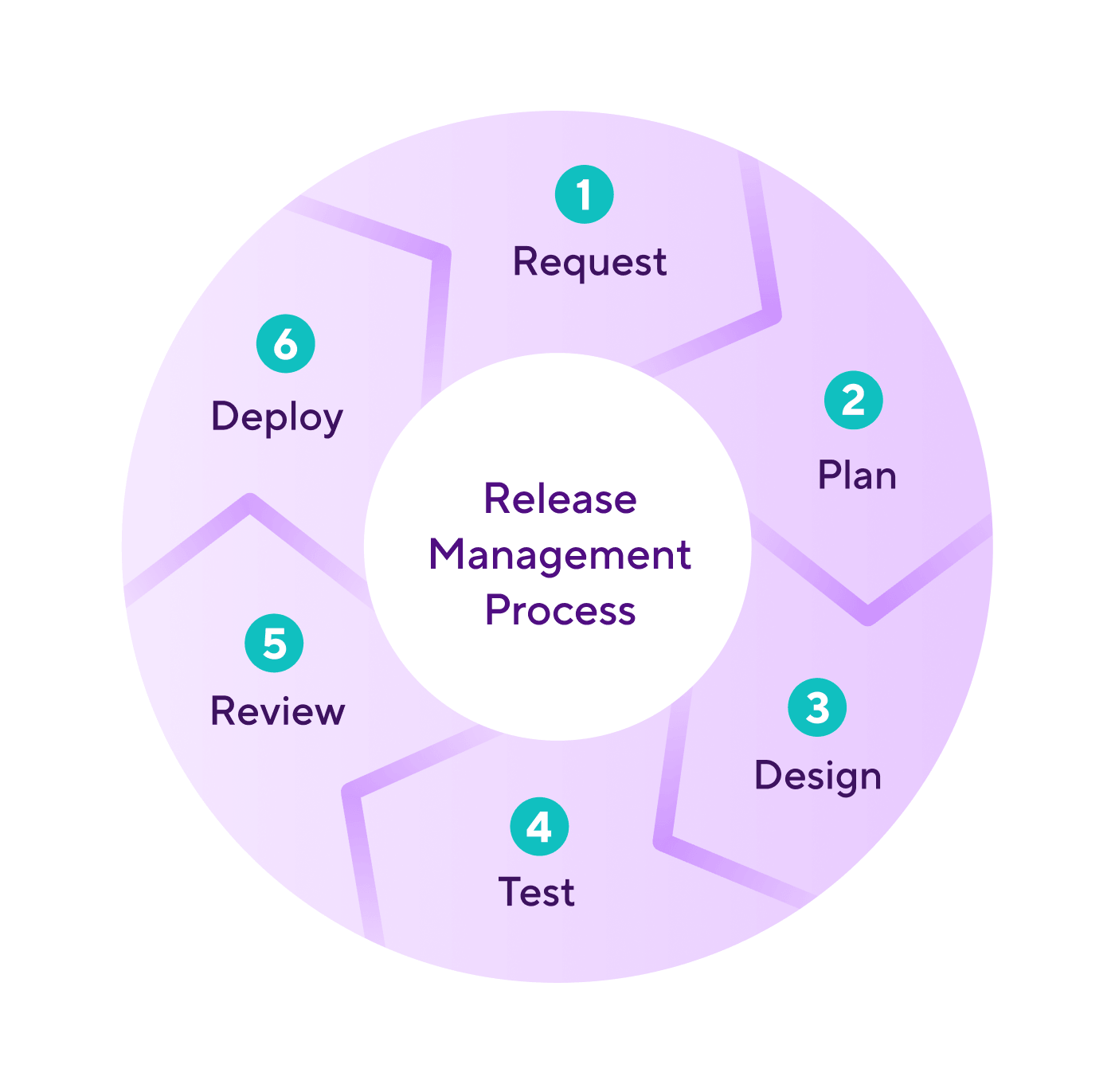
There are six core steps in the process:
1. Request a change
The first step is spotting the need for new features or changes to existing services. Change requests go through designated channels for proper evaluation based on many criteria, including need and feasibility. Not every request gets approved but the ones that do move on to planning.
2. Plan the release
Planning sets up the release and the system that will run it, so it’s worth giving this stage the time it needs. Here you define the structure of the new feature or product update, scope out requirements and create a roadmap for the team to follow. That might be a simple checklist showing tasks, order, and owners, or a more detailed workflow. If your team uses a CI/CD pipeline to automate builds and deployments, the release plan should account for how changes flow through it. Different teams use different tools to make sure that responsibilities, timelines, and requirements are clear.
Good release plans include milestones, owners, and deadlines, plus a clear overview of the whole project and minimum standards for release. A repeatable release system you can use across multiple releases speeds things up later and keeps everyone rowing in the same direction.
3. Design and build
Once the idea is approved and planned, you move into development. This is where you design and build the feature, address issues as they come up, and turn requirements into working software. This stage often overlaps with testing.
4. Test and iterate
As you build, the work should go into real-world testing. Functional and non-functional tests will find bugs and issues, and the release will be sent back for fixes. Most releases iterate between building and testing several times until they’re ready for final review. This is where your continuous integration setup pays off, catching issues automatically every time code is committed.
5. Final review and sign-off
Before deployment, do a final review using all the insights from testing. QA inspects the feature to make sure it meets the standards set in planning. Some issues might still slip through, but the final review should give teams enough information to handle any problems at or after launch.
6. Deploy to production
With sign-off from the project owner, the release goes into production and into the hands of users. It’s good practice to release any supporting material at the same time, such as change notifications, user guides, and training and troubleshooting guides for customer support teams.
Deployment might be a key milestone, but it’s not the finish line. After launch, teams should check how the release performs and feed improvements back into the next release.
Note: Small companies and large organisations follow the same basic process, but complexity grows with scale. Smaller teams may keep things simple while larger teams need more tooling and coordination as releases and stakeholders multiply.
What are the benefits of release management?
Release management isn’t just about checklists or the tools you use: the process has a tangible impact on the final results. Teams with strong release management processes cut uncertainty, boost reliability, and smoothly deliver valuable changes at a regular cadence, without annoying users or disrupting operations.
At scale, releases touch a lot of moving parts: multiple teams, shared environments, external dependencies, regulatory rules, and tight deadlines. Release management gives you the structure to coordinate all that in a controlled, predictable way. Here are some of the key reasons organizations use release management:
Release management best practices
Release management brings teams together around common objectives to improve product quality and customer experience. You and your teams can measure how well it’s working using these success measurements:
New features just work
A clear sign of success is shipping features that actually solve user problems and meet business goals. That means they work as expected and deliver the value you had initially planned for. Measure this with user satisfaction, adoption rates, and the feature’s impact on business outcomes. Features that ship on time, with few defects, and drive positive outcomes show your release process is doing its job.
Clear processes and open communication
Transparent workflows, defined roles, and honest communication are essential. When everyone knows what they’re responsible for, timelines are clearer and mistakes are less likely. Good communication means problems are flagged and fixed quickly, keeping releases on track and aligned with business priorities.
Faster end-to-end delivery
Shorter lead times from development to deployment are a sign of a mature release process. Faster delivery means you can respond to customer needs and the shifting market expectations more quickly. Getting there usually involves some targeted automation and tighter team collaboration, to ensure you can move faster without compromising on quality.
Regular, actionable feedback
Frequent feedback loops, starting with planning all the way through to post-deployment, help you improve continuously. Collect feedback from as many stakeholders as possible so you can make adjustments with every release. Acting on that feedback will only make future releases better and reduce repeat problems.
Stronger compliance
Having a strong release management process makes meeting internal policies and being ready for external audits much easier, because you’ve got accurate records and clear processes for meeting security and legal requirements. Success here shows up as smoother audits, fewer compliance issues, and lower legal or reputational risk.
What is progressive delivery?
Progressive delivery: a smarter way to roll out releases
Progressive delivery is a more modern approach to release management, where your teams can ship features continuously and safely. Rather than the old “all-or-nothing” approach to deployment, it builds on the principles of continuous delivery, teams have finer control over how and when users see changes.
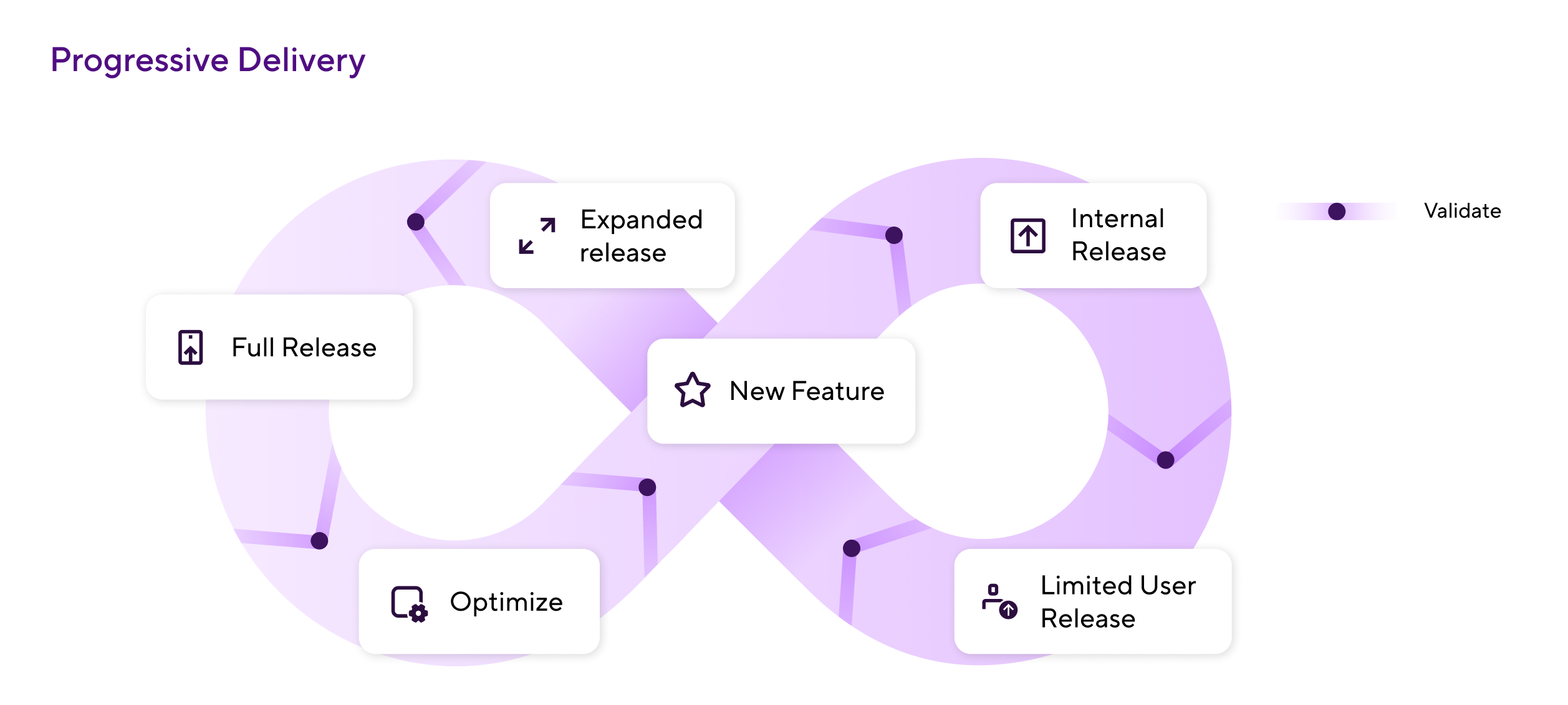
How progressive delivery gives you control
Here are some common features of progressive delivery that make releasing new software more organized and controlled:
When something does slip through, a hotfix process gets the fix out without waiting for the next release.
Release management for mobile apps
Mobile releases work differently and are far less straightforward than web deployments, meaning mobile teams face a unique set of mobile DevOps challenges. App store reviews add days to every cycle, you're shipping to two platforms at once, code signing is non-negotiable, and users update on their own schedule. That means rolling back is rarely instant, and the cost of a bad release is higher.
If you're shipping iOS or Android apps, our mobile release management guide covers the full process: release planning, code freeze, platform-specific builds, testing layers, store submission, phased rollouts, and post-release monitoring.
See what Bitrise can do for you
Confidently build, test, and ship high-quality mobile apps with Bitrise.
Author

Frequently Asked Questions
What is the difference between release management and change management?
Release management focuses specifically on planning, building, testing, and deploying software releases to production. Change management is a broader ITIL discipline that governs how all changes to IT services are evaluated, approved, and tracked. Release management usually sits within an overall change management policy framework, handling the technical delivery of new features to end users, while change management handles the governance and risk assessment around it.
What are the key stages of the release management process?
The release management process typically follows six stages: requesting a change, planning the release, designing and building the feature, testing and iterating, final review and sign-off, and deploying to production. After deployment, teams monitor performance and feed improvements back into the next cycle.
How is release management different for mobile apps?
Mobile releases must go through app store review processes (which can take days), which means teams can't push instant hotfixes the way web teams can. Mobile teams also manage platform-specific builds for iOS and Android, maintain multiple app versions simultaneously, and coordinate phased rollouts across stores.
What tools do teams use for release management?
Release management tools range from general-purpose platforms like Jira and Azure DevOps to purpose-built solutions designed for specific workflows. For mobile teams, the tool needs to be able handle app store submissions, multi-platform builds, phased rollouts, and over-the-air (OTA) updates. Bitrise Release Management is designed specifically for mobile, coordinating the entire process from build to app store across iOS and Android.